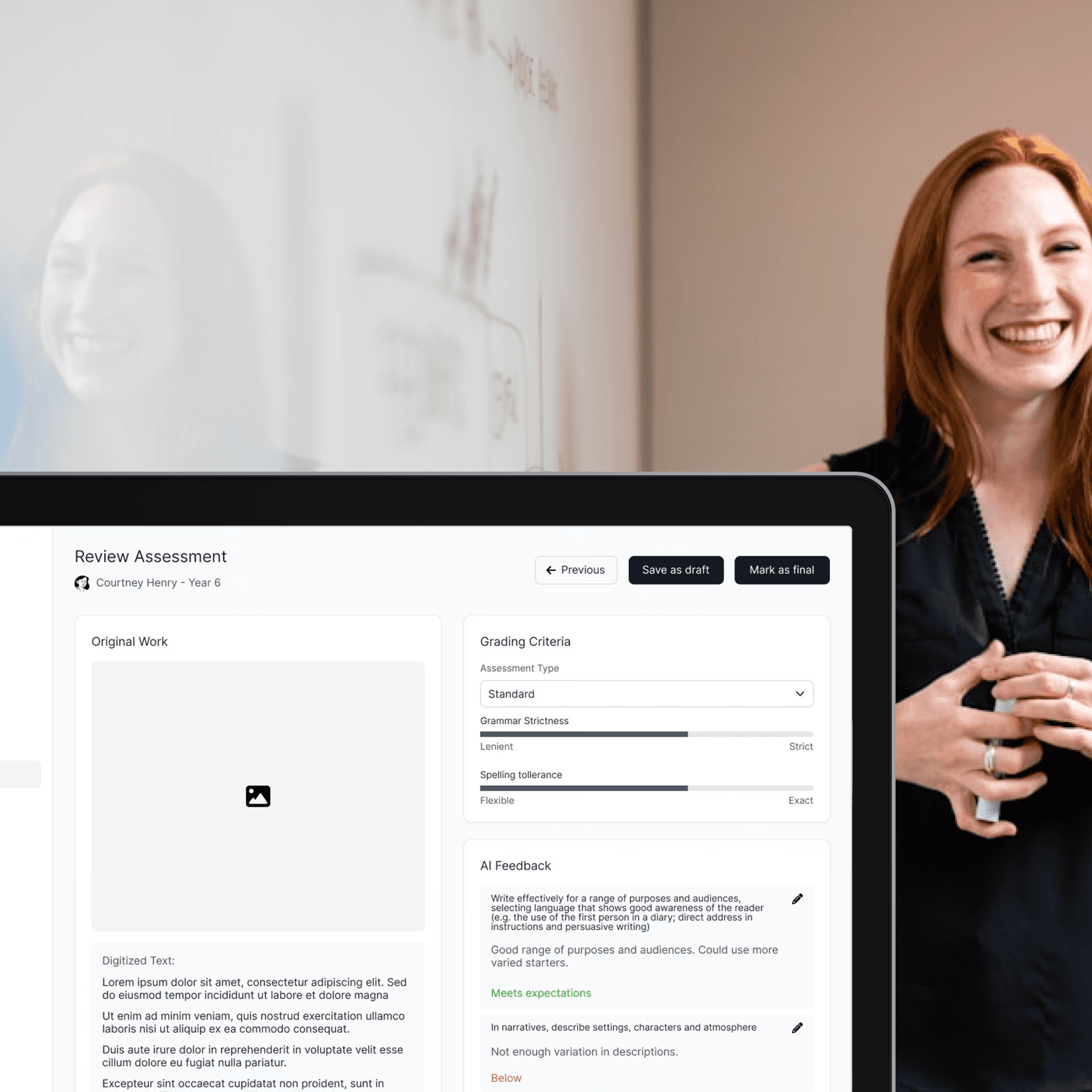

AI-Powered Educational Platform
Helping teachers adopt AI tools with confidence
B2C
EdTech
User Research
Stakeholder Management
Overview
The Challenge
An EdTech entrepreneur needed to validate a concept for an AI-powered grading platform before seeking funding. The challenge was twofold: design a product that would convince teachers to trust AI in their workflow, and create a compelling prototype that would secure investment from education-focused partners. Teachers were skeptical about AI replacing their pedagogical judgment, and investors needed proof that educators would actually adopt the solution.
My Role
Solo product designer from ideation through prototype delivery
Collaborated directly with founder on product strategy and vision
Worked with business team to align design with funding requirements
Partnered with developers and QA to ensure technical feasibility
Conducted iterative usability testing with target users
Timeline
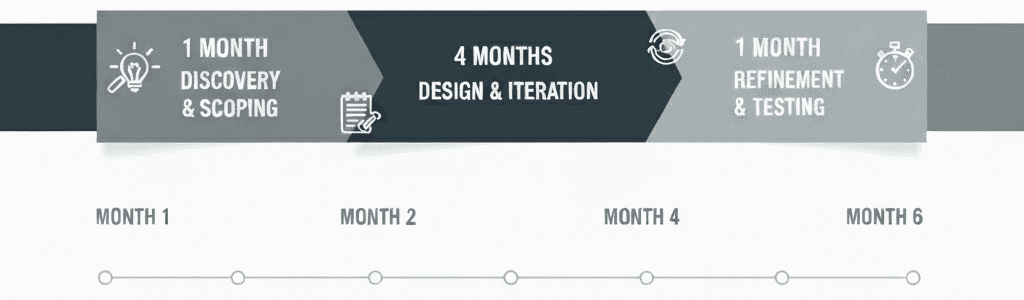
6 months
Outcome
Prototype presented to 50+ teachers at education conference, receiving positive validation
Design work contributed to securing pre-seed funding commitment from 3 partners
Client praised design quality: "I have only ever received compliments on the quality of your Figma work"
Platform awaiting funding completion to proceed to development
Understanding the Problem
The Starting Point
The founder approached us with a hypothesis: teachers spend excessive time grading, and AI could help, but existing AI tools felt impersonal. The goal wasn't just to build another auto-grading tool; it was to create something teachers would willingly integrate into their practice.
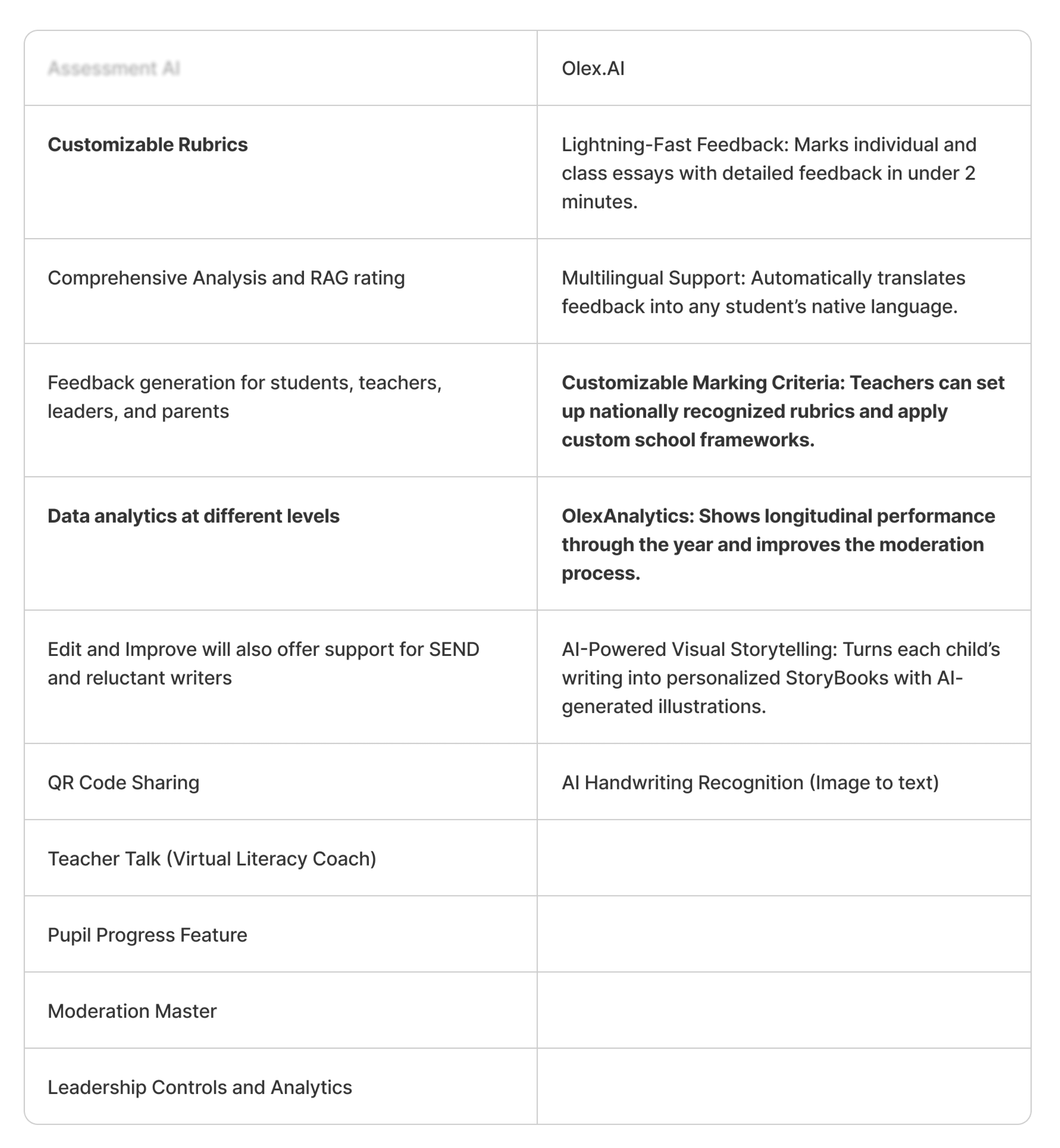
Image of competitors analysis conducted to define features of our Education Platform versus Olex.AI, a competitor in the AI for Education space.
The Core Tension
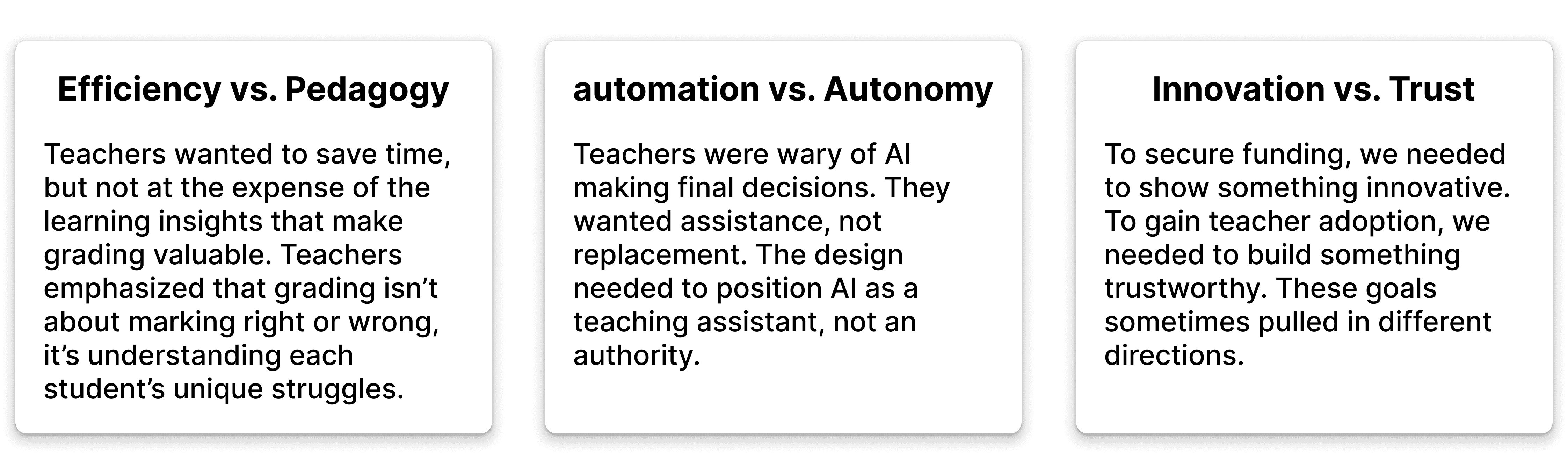
Through discussions with the founder (who had conducted initial teacher interviews), three key tensions emerged:
Key Insights from Teacher Feedback
Based on the founder's conference engagement with 50+ teachers:
Teachers weren't afraid of AI taking their jobs, they were afraid of losing control
Time savings only mattered if the quality of feedback to students remained high
Transparency in AI recommendations would be critical for adoption
Teachers needed the ability to override AI decisions without friction
Design Process
Starting with Requirements
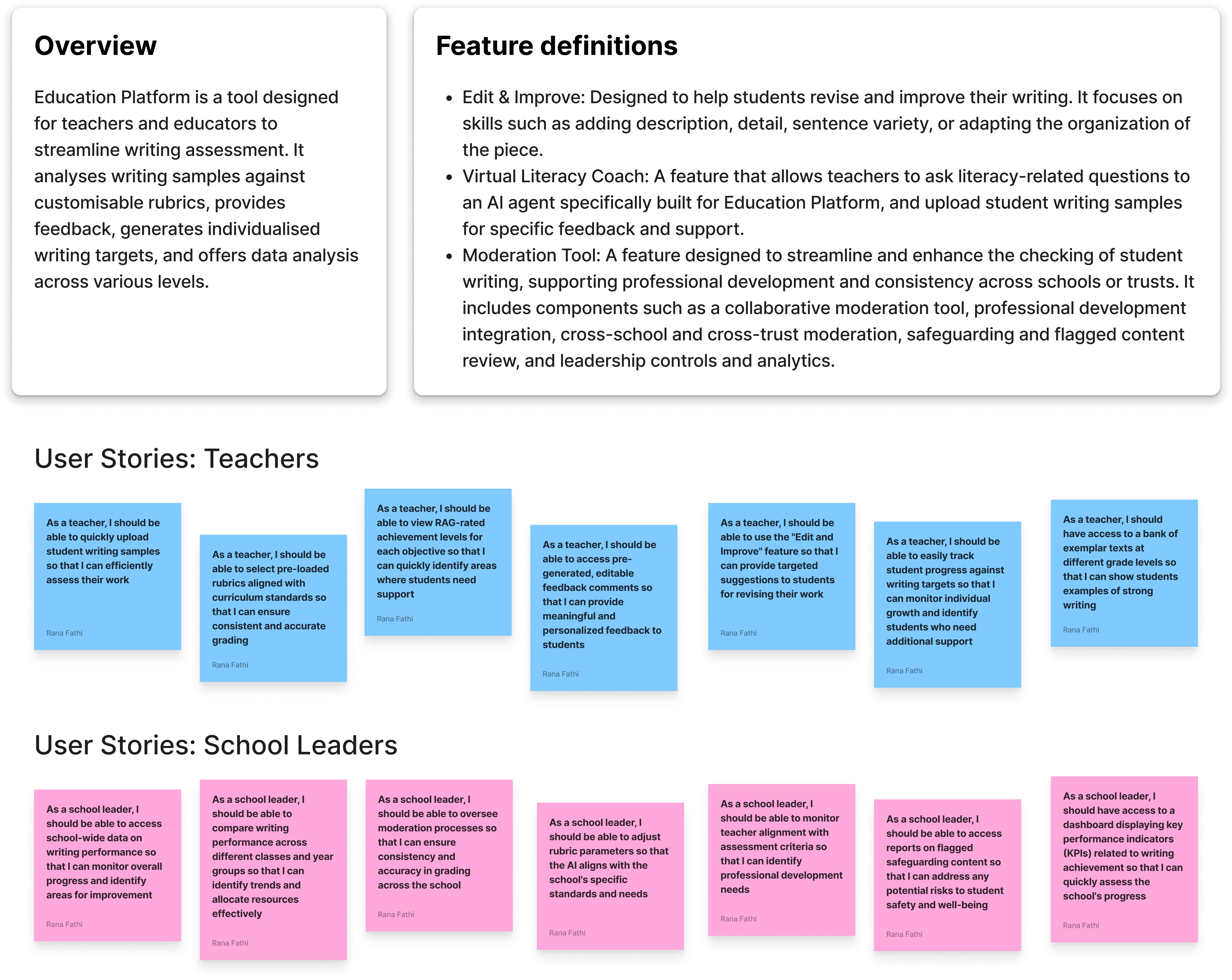
I began by collaborating with the founder to establish clear scope and requirements. We created a comprehensive scope document that included:
Product overview and vision
User stories for different teacher workflows
Competitive analysis of existing AI grading tools
Technical constraints and feasibility considerations
This foundation helped align stakeholder expectations and gave me clear design parameters.
Iteration 1: Requirements-Based Design
The Hypothesis: Design based on scoped requirements and competitive best practices
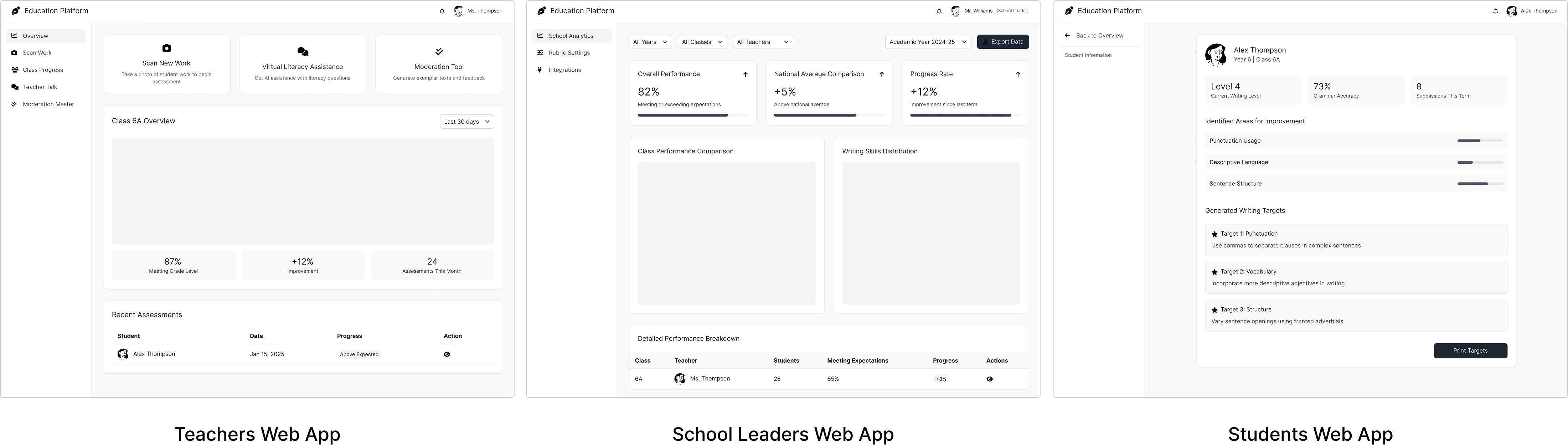
Working from the scope document and user stories, I created the first iteration. This version included three distinct user types: administrators, teachers, and students, each with different permission levels and workflows.
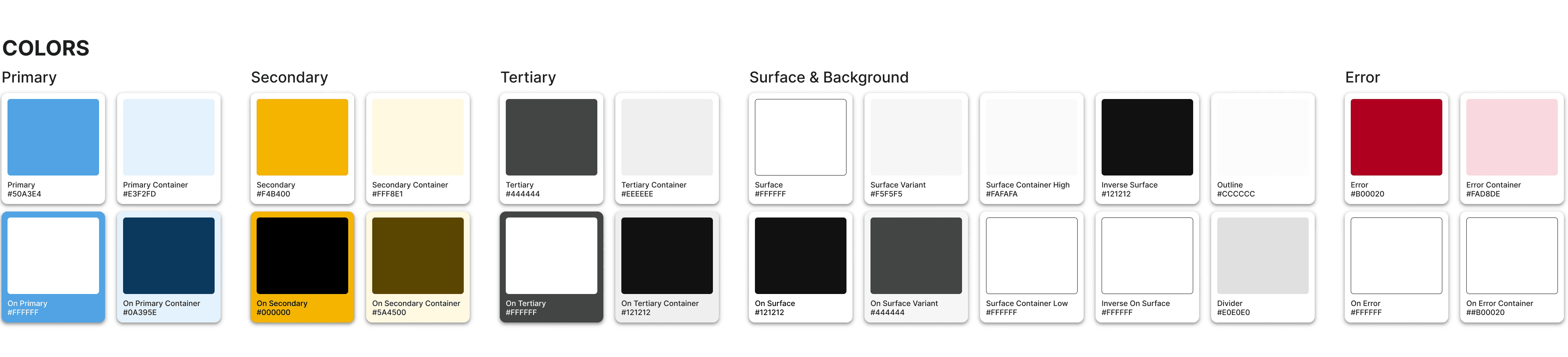
The interface prioritized comprehensive functionality showing everything users might need across different scenarios. I explored UI style directions, establishing color palettes and visual language options for the client to choose from.
What Happened:
When I presented this to the client, we realized the scope was too ambitious for a first version. The complexity of managing three user types would slow development and make the funding pitch less focused. The client needed something they could demonstrate clearly and build iteratively.
Client Feedback:
The functionality was sound, but we needed to simplify for an MVP that could prove the core value proposition quickly.
What Changed:
We agreed to reduce from three user types to two (administrators and teachers), prioritizing the core grading workflow over advanced permission management. Several nice-to-have features were deferred to future versions.
Iteration 2: Streamlined MVP
The Hypothesis: Focus on the essential teacher workflow to create a demonstrable prototype.
I redesigned with a tighter focus. The two-user system simplified the architecture significantly. I refined the core grading workflow, making it the centerpiece of the design rather than one of many features.
The UI became cleaner, with the chosen visual style applied consistently. Navigation was simplified, and I removed features that didn't directly support the primary use case: helping teachers grade more efficiently with AI assistance.
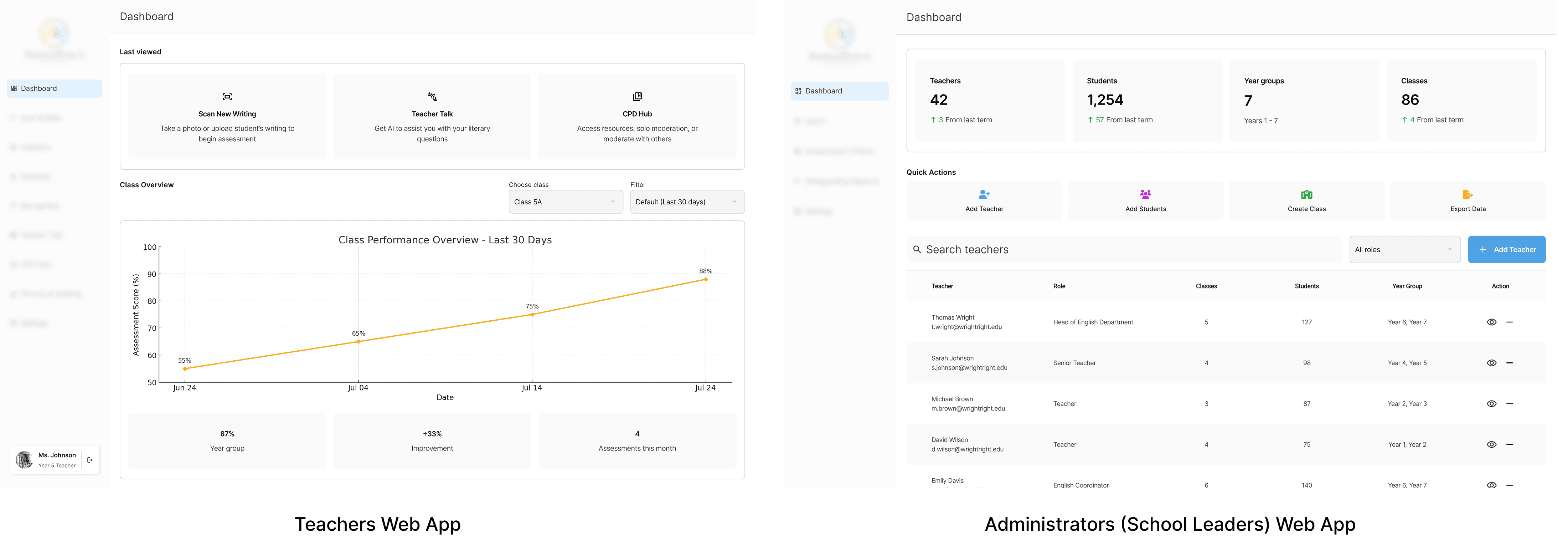
After narrowing our focus to two users, the dashboard for teachers (left) and for administrators (right) show simplified calls-to-action to help them reach the desired functionality rapidly.
What Happened:
This version tested well internally. The client was satisfied:
| "Thanks for the update Rana, I'm very happy with this as it clearly encapsulates everything we scoped!"
But we still needed to validate with actual teachers. Would they find it intuitive? Would they trust the AI recommendations? These questions could only be answered by putting it in front of the target audience.
Final Iteration: Teacher-Validated Design
The Hypothesis: Refine based on real teacher feedback from conference presentation
After the client presented the prototype to 50+ teachers at an education conference, clear feedback patterns emerged:
What Teachers Wanted:
More visibility into why AI made certain grading decisions
Ability to customize AI behavior for their specific teaching style
Clearer indication of when AI was uncertain vs. confident
Faster ways to review and approve routine assignments
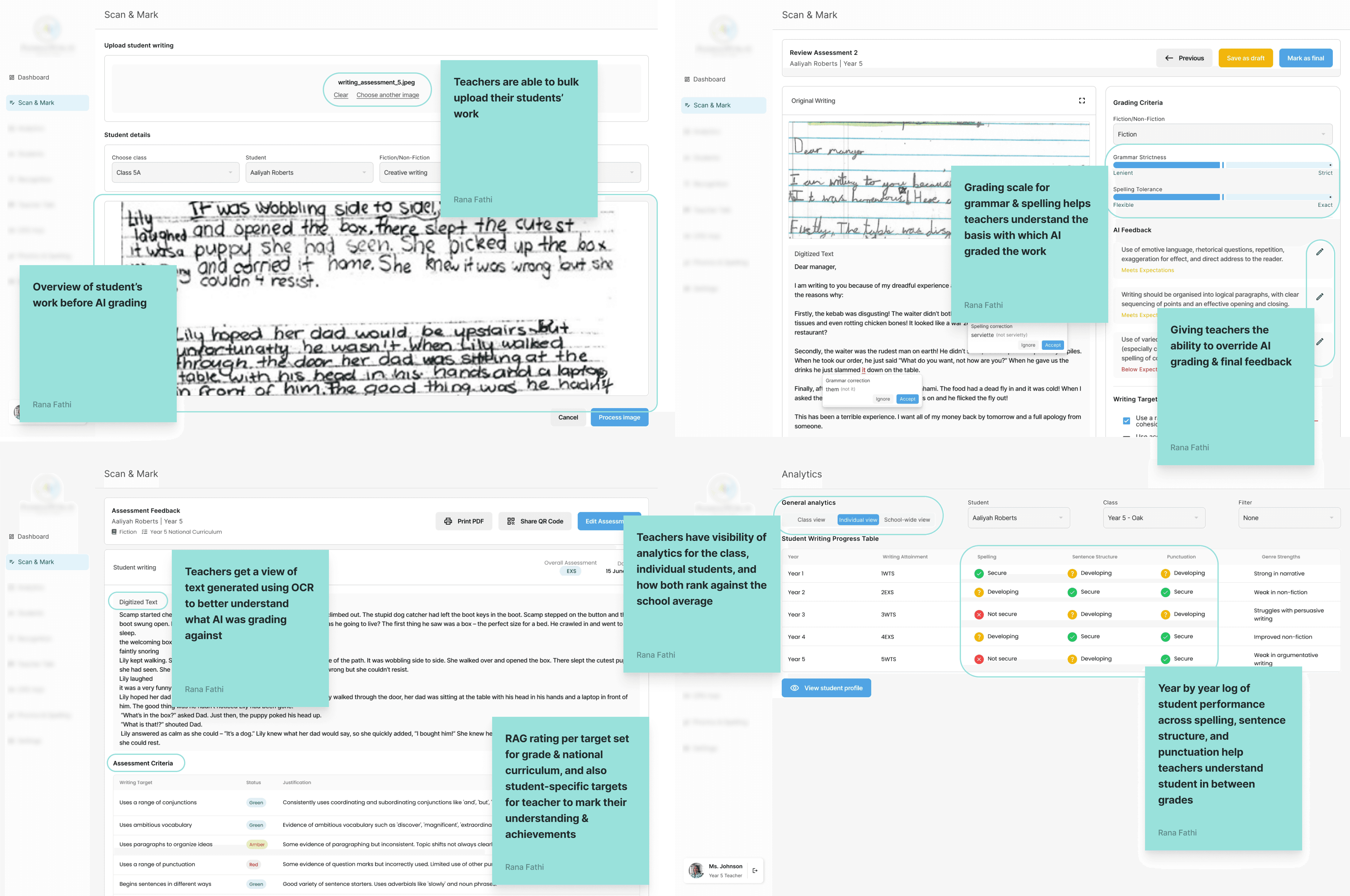
Final design incorporating feedback from 50+ teachers: added AI transparency, confidence indicators, and streamlined review workflows
The final design balanced efficiency with transparency, giving teachers the shortcuts they wanted for routine work while maintaining full visibility for complex assessments.
Key Design Decisions
Building Trust Through Transparency
Rather than hiding AI complexity, I made it inspectable. Teachers could click "Why this grade?" to see exactly how AI evaluated student work against the rubric.
Maintaining Teacher Authority
Every screen reinforced that teachers had final say. Override buttons were prominent, never buried. AI suggestions were framed as "recommendations" not "results."
Designing for Variation
Different teachers have different workflows. I designed for both the teacher who wants to review every item carefully and the teacher who trusts AI for routine assignments but dives deep for major assessments.
The Solution
Core Workflows
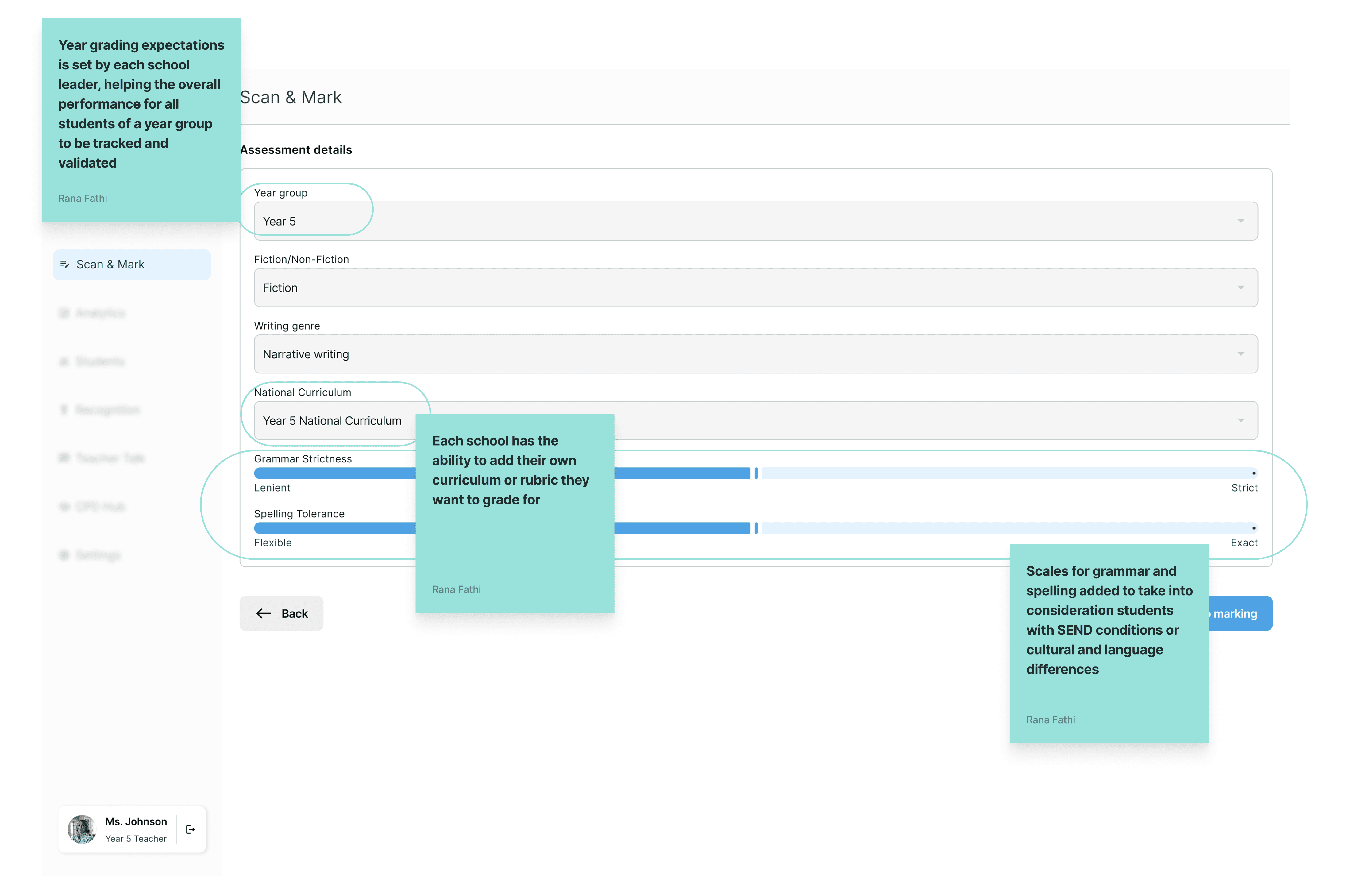
Assignment Setup
Teachers uploaded their rubric and assignment details. The AI would analyze based on their specific criteria, not generic standards. This customization was critical for teacher buy-in.
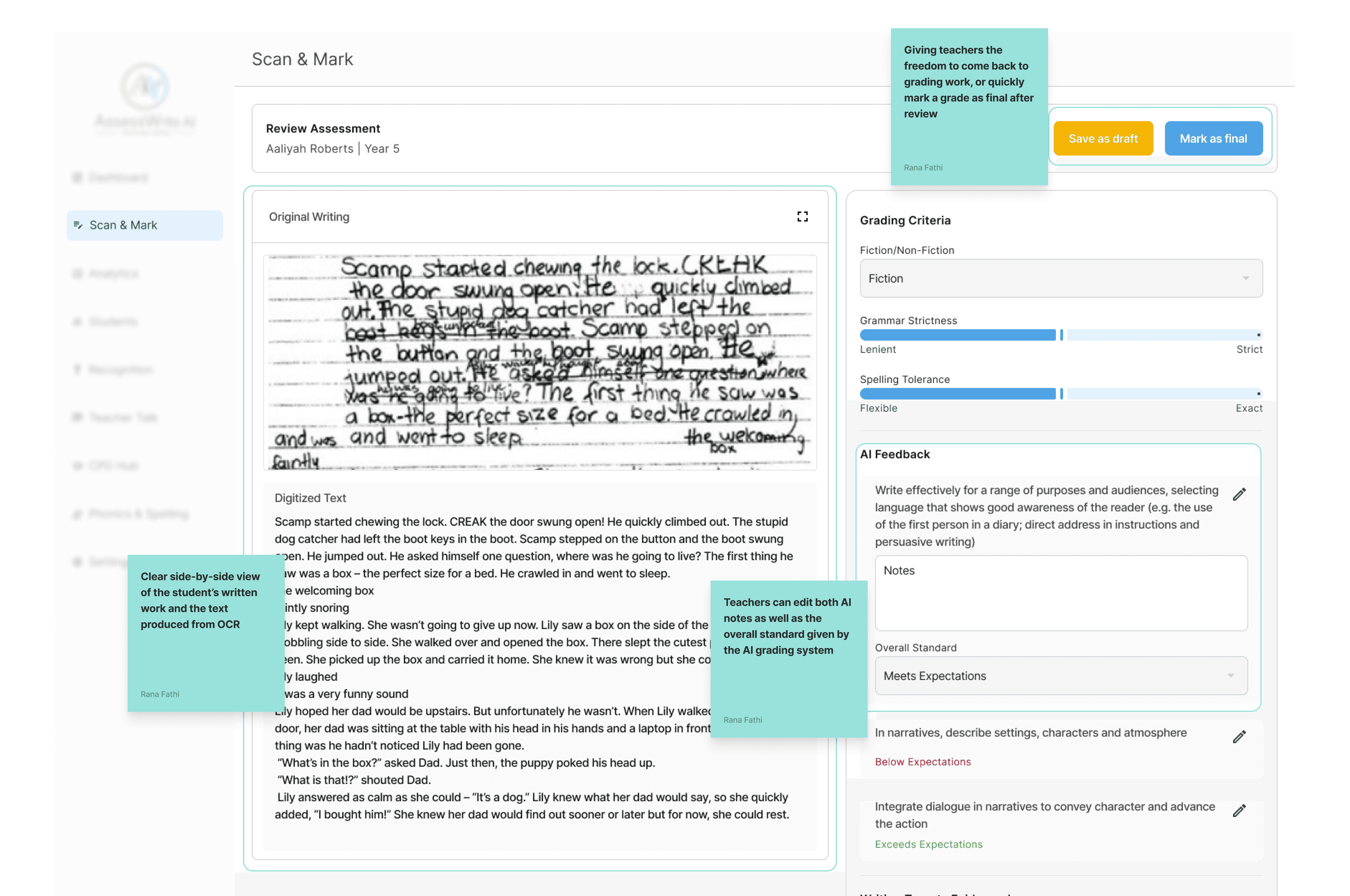
Review Interface
The heart of the platform. One-click accept for straightforward cases. Quick edit for minor adjustments. Full override with custom feedback for cases requiring teacher expertise.
Technical Collaboration
Working with developers, we tackled several technical constraints:
Performance Optimization
Initial designs called for real-time AI analysis, but this proved technically complex and costly. We shifted to batch processing overnight for non-urgent assignments, with on-demand analysis for rush cases.Data Privacy
Student work couldn't be stored on external AI servers due to privacy regulations. We designed for on-premise AI processing, requiring additional loading states and offline functionality I hadn't originally planned for.Rubric Complexity
Different subjects had vastly different rubric structures. For version one, we focused on an English rubric within the UK education system. The system in place is expandable to later adapt to everything from simple math problems to complex essay evaluations
Business Requirements Integration
The business team needed the prototype to clearly demonstrate:
Time savings
Adoption potential (we designed for easy onboarding with minimal training)
Scalability (component-based design that could extend to different subjects)
These requirements influenced decisions like adding comparison views that might not have been my first design instinct but proved critical for stakeholder presentations.
Impact & Outcomes
Presentation Success
The prototype was presented to 50+ teachers at an education conference. Teachers validated the approach, with many expressing interest in participating in beta testing when the product launched.
Funding Achievement
The design work directly contributed to securing pre-seed funding commitment from 2 partners. The prototype demonstrated both technical feasibility and teacher validation, de-risking the investment. The platform is currently awaiting final funding completion to proceed to development.
Client Satisfaction
Throughout the 6-month engagement, the client consistently praised the design quality: "Thanks for the update Rana, I'm very happy with this as it clearly encapsulates everything we scoped! I have only ever received compliments on the quality of your Figma work!"
Reflection
What I Learned
Teachers are expert users in their domain
My initial designs underestimated how much teachers would want to understand AI decision-making. They weren't intimidated by complexity, they were skeptical of opacity. Designing for transparency over simplicity was the right call.
Stakeholder needs differ, but good design bridges them
The business team needed compelling metrics. Teachers needed pedagogical control. Developers needed technical feasibility. Rather than treating these as competing constraints, I found solutions that served all three: features like dashboards satisfied business needs while still centering teacher autonomy.
Usability testing with real audiences is irreplaceable
Working through the client to test with actual teachers revealed assumptions I wouldn't have caught otherwise. The shift from Iteration 1 to Iteration 2 came directly from teacher feedback that I couldn't have predicted.
What I'd Do Differently
Involve teachers earlier in wireframing
While the client handled initial interviews, I wish I'd been part of those conversations. Some of my early design concepts could have been validated or invalidated sooner, saving iteration time.
Design for onboarding from day one
I focused heavily on the core grading workflow but designed onboarding and training flows as an afterthought. Given teacher concerns about adopting new technology, I should have prototyped the "first 15 minutes" experience earlier.
Document decision rationale more thoroughly
As a solo designer, I made many decisions in conversation with the client. Better documentation of "why we chose this approach over that one" would have helped when new stakeholders joined later in the process.
Key Takeaway
This project reinforced that the best AI products don't try to replace human judgment, they augment it. When designing trust-dependent features like AI recommendations, showing your work (the AI's reasoning) is just as important as the result itself. Teachers didn't want a black box that magically graded papers; they wanted a transparent tool that helped them do their job better while maintaining their professional expertise and pedagogical goals.